
Comparison
The best apps to translate WhatsApp voice notes
Got a WhatsApp voice note in a language you don't speak? Here are the apps people actually use for it, what each one really does, and which to pick. Updated October 2026.
The short answer
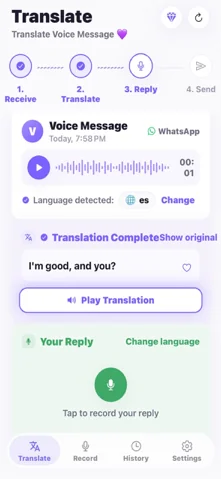
The best app to translate WhatsApp voice notes is ReplyLingo, a voice message translator for iPhone and Android that is free to start. You share the voice note from WhatsApp into ReplyLingo and it transcribes it, translates it into your language and reads the translation aloud in a natural voice, across 100+ languages. You can then record a reply in your own language and ReplyLingo translates and speaks it in the sender's language, ready to send back on WhatsApp. Transcription apps such as Transcriber for WhatsApp and WhatsApp's own Voice Message Transcripts only turn speech into text in the same language, and Google Translate needs the voice note transcribed first.
1. ReplyLingo: best overall for translating and replying
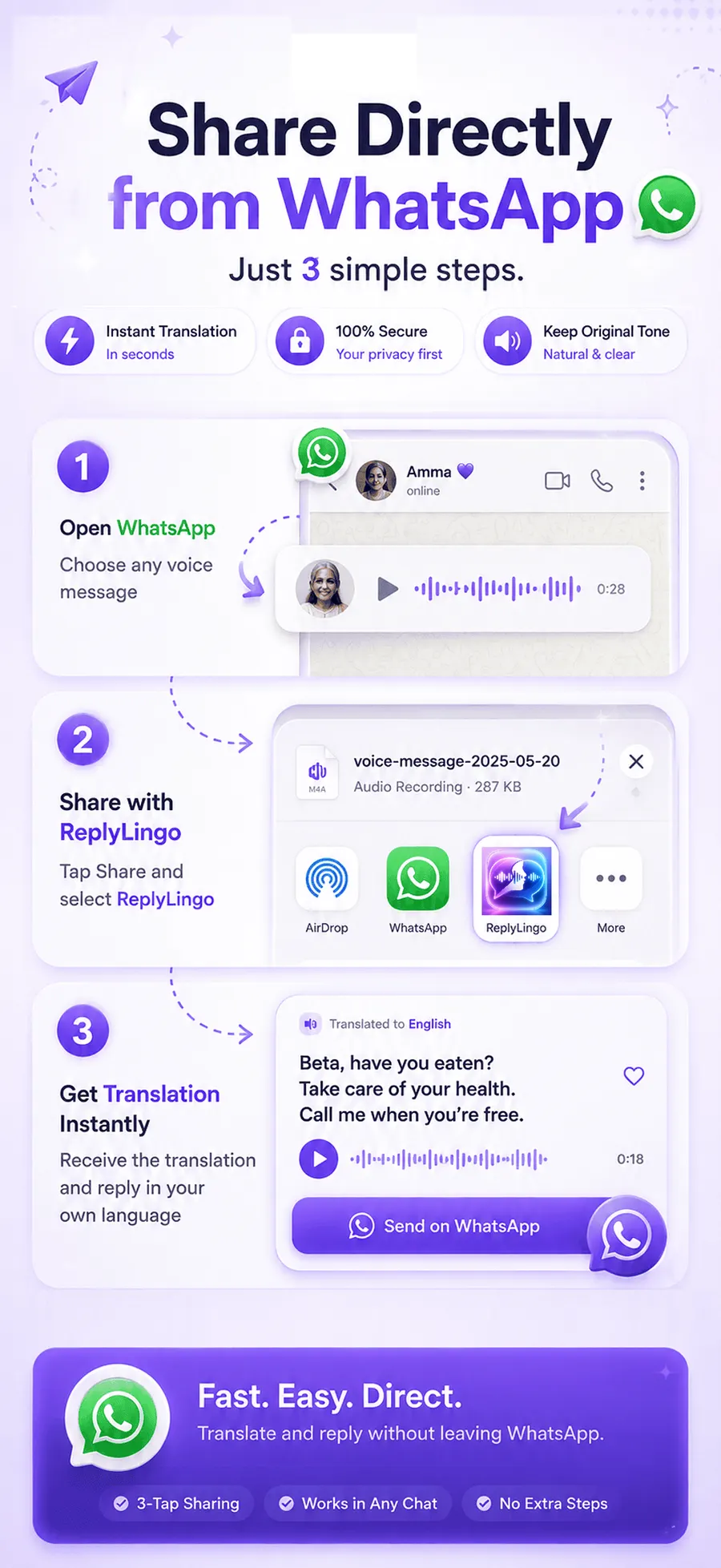
ReplyLingo is built for exactly this job. Long-press the voice note in WhatsApp, tap Share or Forward, choose ReplyLingo, and within seconds you get a transcript, a translation and the translation read aloud in your language. It detects the spoken language automatically, so you don't need to know what language the voice note is in.
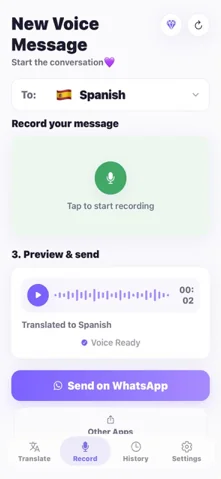
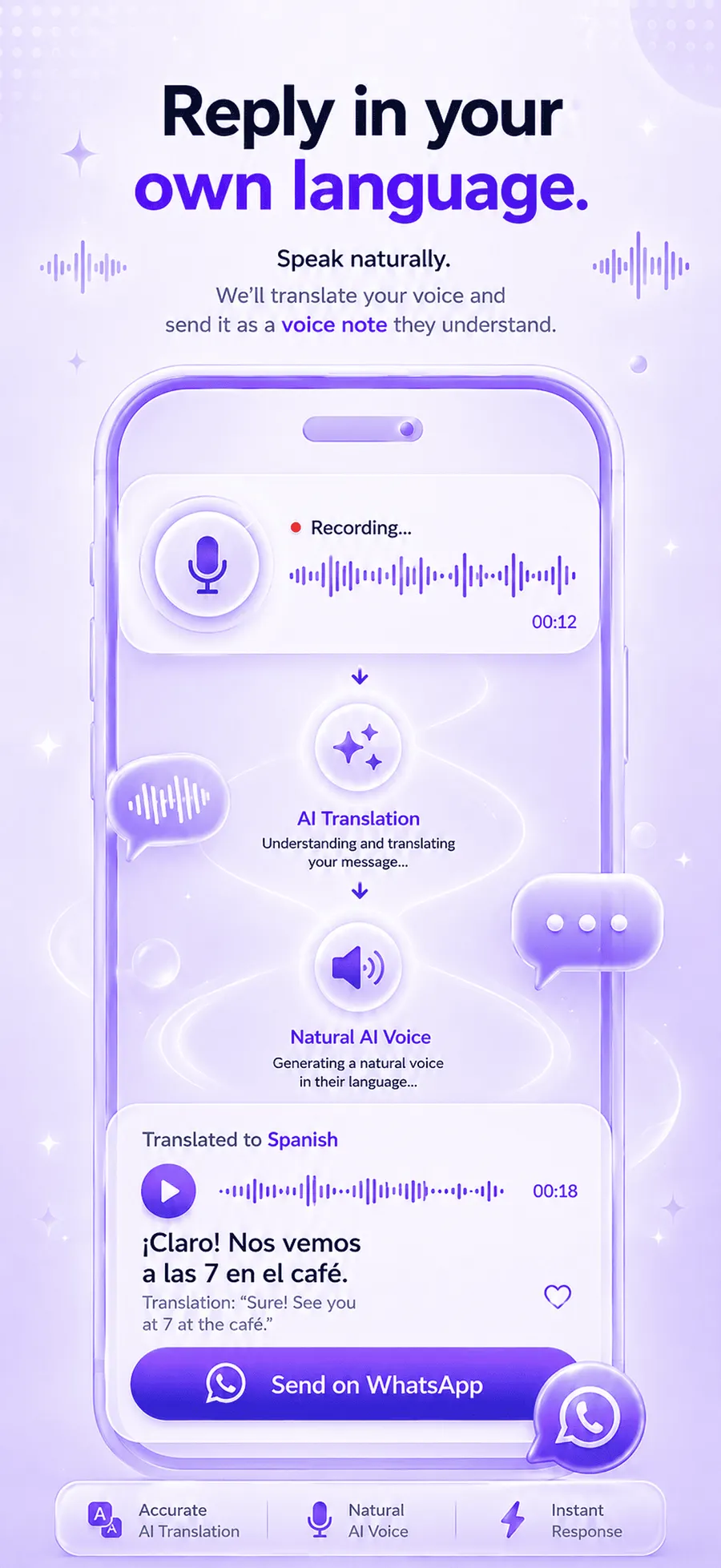
What sets it apart is the reply. Record your answer in your own language and ReplyLingo translates it and speaks it in the sender's language, then hands it to your share sheet so you can send it back as a voice message on WhatsApp. It works the same way for Telegram, Instagram, Messenger and any app that can share an audio file.
Platforms: iPhone and Android. Price: free to start with a daily allowance; Pro removes the limit. Privacy: your conversation history stays on your device and there is no server-side copy of your audio.
2. Transcriber for WhatsApp: good for reading, not translating
Transcriber for WhatsApp turns a voice note into written text. You share the voice note into it, the same way, and read the words instead of listening. That is handy when you understand the language but can't play audio, for example in a meeting.
The catch is that a transcript is in the same language the person spoke. If the voice note is in a language you don't understand, you still have to copy the text into a separate translator, and there is no spoken translation or translated reply.
3. WhatsApp's built-in Voice Message Transcripts
WhatsApp can show a text transcript of a voice message on its own. It is free and already on your phone, but like other transcription tools it shows the words in the original language rather than translating them, and it only covers a limited set of languages.
Good for: reading voice notes in a language you already know. Not enough for: understanding a language you don't speak.
4. Google Translate: free, but it can't open a voice note
Google Translate is excellent at text and live speech, but it has no way to receive a WhatsApp voice note. To use it you either type out what you hear, or play the voice note out loud next to your phone's microphone and hope it picks it up cleanly. It also can't produce a translated voice reply to send back.
Good for: short phrases and typed text. Clumsy for: voice notes someone sent you.
5. Kaption AI and other WhatsApp Web tools
Kaption AI and similar tools add transcription, summaries and translation on top of WhatsApp, and are mainly aimed at WhatsApp Web on a computer. They suit people who work from a desktop all day.
If most of your voice notes arrive on your phone, a phone app that uses the normal share menu is quicker, because you don't need to be at a computer with WhatsApp Web open.
Which one should you choose?
- You don't speak the language and want to hear it in yours: ReplyLingo.
- You also want to answer back by voice in their language: ReplyLingo.
- You understand the language and just want to read instead of listen: Transcriber for WhatsApp or WhatsApp's own transcripts.
- You only need a quick text phrase translated: Google Translate.
- You handle WhatsApp mostly on a computer through WhatsApp Web: a WhatsApp Web tool such as Kaption AI.
Side-by-side comparison
How the main options handle a WhatsApp voice note you received.
| App | Translates the voice note? | Speaks the translation? | Voice reply? |
|---|---|---|---|
| ReplyLingo | Yes, 100+ languages | Yes, natural AI voice | Yes, translated and spoken |
| Transcriber for WhatsApp | No, same-language text | No | No |
| WhatsApp Voice Message Transcripts | No, same-language text | No | No |
| Google Translate | Only after you transcribe it | For typed text | No |
| Kaption AI (WhatsApp Web) | Yes, on a computer | Varies | No |
Related guides
Frequently Asked Questions
Translate your next WhatsApp voice note
Free to start. No sign-up needed. Continue as a guest.