
Comparison
The best iPhone app to translate voice messages (2026)
Six iPhone apps compared for translating a voice message you received, and for answering it. What each one does, what it costs and who should pick which.
Last updated: 18 November 2026
We make ReplyLingo. Every other app was compared using its own official pages and App Store listing, read on 18 November 2026. Apps change, so check the listing before you buy.
The short answer
The best iPhone app to translate a voice message you received on WhatsApp, Telegram or another messaging app is ReplyLingo: you share the voice note to it from the iPhone share sheet, read and hear the translation, and reply with a voice message in the sender's language. For a live, face-to-face conversation, Apple Translate or Google Translate is the better free choice. For typed text and documents, DeepL or Google Translate. Apple's, Google's, DeepL's and Microsoft's official pages describe live microphone translation, not translating a voice note shared from another app.
Quick picks: which iPhone app for which situation
- A voice note someone sent you on WhatsApp or Telegram, and you want to answer back by voice: ReplyLingo.
- A live conversation with someone in front of you: Apple Translate (built into iPhone) or Google Translate.
- Typed or pasted text, or a document: DeepL or Google Translate.
- Video messages as well as voice notes: Sayvo, whose site lists video and round video messages.
- Translating your WhatsApp chat with typed replies: WhatLingo, which is built around WhatsApp messages and voice notes.
How we compared these apps
We make ReplyLingo, so we tell you that first and then try to be fair. For every other app we read its own help pages, product pages and App Store listing on 18 November 2026, and we write down only what those pages say. When a page does not mention a feature we write "not described on its official pages" instead of saying the app cannot do it. The sources are listed at the bottom of this page.
We judged each app on the questions that matter for voice messages: can it take a voice note you received from WhatsApp or Telegram, can you answer in the other person's language (and by voice), how many languages it covers, what it costs on iPhone, and how it says it handles your audio.
1. ReplyLingo: best for voice notes you receive and want to answer
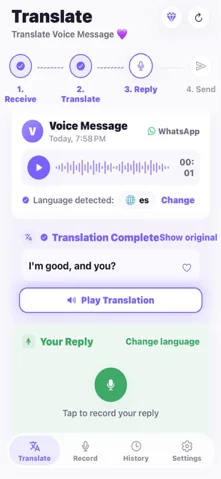
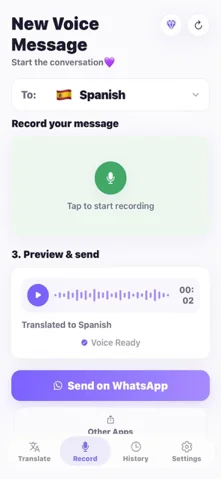
ReplyLingo is built for one job: a voice note arrives in a language you don't speak. On iPhone you press and hold the voice message in WhatsApp or Telegram, tap Share or Forward, and choose ReplyLingo. It detects the spoken language, shows the transcript next to the translation, and reads the translation aloud. Then you record your reply in your own language and ReplyLingo speaks it in the sender's language, ready to send back in the same chat.
It translates into 100+ languages, with spoken voice replies in 55 of them (in the others you get the translated text). If you would rather type, tap Reply by text, or use the Text tab to translate anything you type, paste or speak. It works with any app that can share an audio file, and there is no account: you continue as a guest.
Limits: it needs an internet connection, voice messages longer than about 3 minutes are trimmed to the first 3 minutes, the spoken voice is a synthetic voice rather than your own, and it does not translate video messages. It is not a live conversation tool.
Price and privacy: free to start with 3 free translations, reset every week, and ReplyLingo Pro removes the limit (the current price is shown in the app). Your history stays on your phone, ReplyLingo keeps no server-side copy of your audio, transcripts or translations, and audio is sent to OpenAI and Google Cloud only while a translation is processed.
2. Apple Translate: best built-in option for live conversations
Apple Translate comes with iPhone. Its App Store listing describes text translation, a Conversation tab where you tap the microphone and speak, camera translation of text around you, and an on-device mode for a fully offline experience with downloaded languages. The listing names 21 language options, counting regional variants such as English (US) and English (UK), and says Live Translation with AirPods needs an iPhone on iOS 26 with AirPods 4 (ANC) or AirPods Pro 2 and later, in English, French, German, Portuguese (Brazil) and Spanish.
Good for: a conversation in person, signs and menus, and typed text, all free and private on the device. Not described on Apple's pages: translating a voice message that you shared from WhatsApp or Telegram, or an audio file. The pages we read cover speaking or typing into the Translate app itself.
3. Google Translate: best free all-rounder, widest language list
Google's help pages say you can translate text, handwriting, photos and speech in over 200 languages. Its live modes include Conversation, where translations play out loud and you take turns speaking, and Transcribe, which translates in near real time while someone speaks a different language. You can download languages for offline use, and there is an iPhone app.
Good for: the widest range of languages, typed text, and live conversations. Not described on Google's help pages: translating a voice message shared from another app or an audio file. Its "translate text in other apps" feature covers copied text.
4. DeepL: best for natural-sounding text translation
DeepL's iPhone app lets you translate by typing, pasting or speaking, translate photos from the camera, and translate files including PDFs. Its Translator page says it covers 100+ languages. DeepL Voice is a separate product for online meetings (40+ languages, on a subscription) and for in-person conversations.
Good for: polished translations of written text and documents. DeepL's pricing page lists a free version with a monthly character limit (50,000 characters when we read it). Not described on its pages: translating a voice message or audio file shared from another app.
5. Microsoft Translator: free, with live conversations
Microsoft Translator's iPhone app is free according to its iOS help page, and it can host or join a live translated conversation. Speech translation works only while you are online. Its iOS help page says the app does not support translation of external media sources or files, such as movies or video clips, so it is not designed for a voice note shared from WhatsApp.
6. WhatLingo: for translating WhatsApp chats, with typed replies
WhatLingo's App Store listing (subtitle "WhatsApp Message & Voice Notes") says it translates incoming messages, including voice messages, and that you reply in your language with your regular keyboard. The description says over 40 languages (another line in the same listing says 35). Replying by voice is not stated.
Price and cost: the listing says it is free to download with in-app purchases, a 7-day free trial for new users, and that a subscription is required to send messages while reading messages is free. Listed subscriptions include $6.99 monthly, $2.99 monthly, $34.99 semiannual and $39.99 annual. It showed a 4.7 rating from 180 ratings when we read it.
7. Sayvo: voice, text and video messages with daily free limits
Sayvo's App Store listing says it translates voice messages and text messages shared from any messenger, and its site says it also translates video and round video messages, summarises long voice notes and supports dictation. Its site lists 50+ languages and says audio and text pass through its server to OpenAI and are not stored. You can reply from the translation screen; spoken replies are not listed on its site.
Price: free with daily limits. Listed premium plans were $1.99 weekly, $4.99 monthly, $29.99 yearly and $59.99 lifetime. The listing showed no rating yet when we read it. iPhone only, iOS 16 or later.
How to translate a WhatsApp voice message on iPhone with ReplyLingo
Four steps
- 1Install ReplyLingo from the App Store and continue as a guest. No sign-up is needed.
- 2In WhatsApp or Telegram, press and hold the voice message, tap Share or Forward, and choose ReplyLingo from the share sheet.
- 3Read the transcript and listen to the translation in your language. It usually takes a few seconds.
- 4Record your reply in your language. ReplyLingo speaks it in theirs, and you send it back to the chat.
What to check before you choose an iPhone voice translator
- Can it take a voice note you received? Many translators only listen through the microphone, so a voice note sent to you in WhatsApp needs an app that accepts a shared audio file.
- Can you answer in the other person's language, and by voice? Some apps translate only what you receive, some translate a typed reply, and a few speak your reply for you.
- Does it cover the language pair you need? Check the exact languages, not just the total number.
- What does it do with your audio? Voice notes are personal, so read the privacy policy and note whether audio is stored.
- What is free? Compare the free limit (per week or per day) and the length limit on a single voice message.
- For anything important, such as money, health or legal matters, double-check the key details with the sender.
Sources
All facts about other apps on this page come from each app's own pages, read on 18 November 2026. Prices and language counts change, so check the listing before you buy. ReplyLingo facts come from the ReplyLingo app and this site.
Side-by-side: iPhone apps for translating voice messages
Based on each app's own pages, read on 18 November 2026. "Not described" means its official pages do not mention it, not that the app cannot do it.
| App | Translates a voice note shared from WhatsApp or Telegram | Replying in their language | Languages (as stated) | Price on iPhone |
|---|---|---|---|---|
| ReplyLingo | Yes, from the share sheet | Spoken voice reply (55 languages) or text | 100+ | Free to start (3 free translations a week), Pro subscription |
| Apple Translate | Not described | Live Conversation mode | 21 language options listed | Built into iPhone |
| Google Translate | Not described | Live Conversation mode | Over 200 | Free app |
| DeepL | Not described | DeepL Voice for meetings and in-person conversations (separate product) | 100+ (text) | Free version with monthly limit, paid plans |
| Microsoft Translator | No: its iOS help says it does not translate external media files | Live translated conversation | Not counted here | Free |
| WhatLingo | Yes, voice messages included | Typed reply, translated | 40+ (listing) | Free to read, subscription to send ($2.99 to $39.99 listed) |
| Sayvo | Yes, voice, text and video | Reply from the translation (spoken replies not listed) | 50+ | Free with daily limits, premium from $1.99 weekly |
Related guides
Frequently Asked Questions
Translate your next voice message on iPhone
Free to start. No sign-up needed. Continue as a guest.