
About the app
What Is ReplyLingo?
The facts in one place: what the app does, who it is for, which phones and languages it supports, what it costs and what it cannot do.
Last updated: November 2026
The short answer
ReplyLingo is a voice message translator app for iPhone and Android. You share a voice message from WhatsApp, Telegram or any app that can share audio, and it detects the language, writes out what was said, translates it into your language and reads the translation aloud. You can then record a reply in your own language, and ReplyLingo speaks it in the sender's language so you can send it back as a voice message. It is free to start with 3 free translations, reset every week, and a Pro subscription removes the limit.
What ReplyLingo does
- Detects the language of a voice message automatically, so you do not need to know what it is.
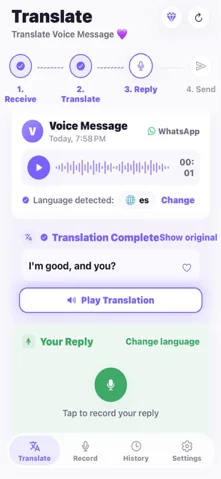
- Shows a written transcript in the original language, and the translation in your language. Tap Show original to switch between them.
- Reads the translation aloud with a natural voice.
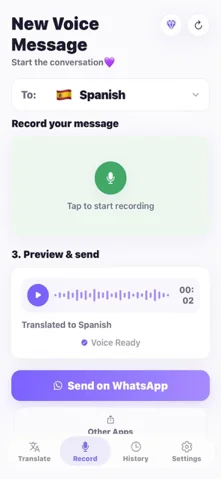
- Lets you record a reply in your own language, translates it, speaks it in the sender's language and lets you preview it before you send it.
- Keeps your past translations in a History tab on your device, which you can open offline.
Who it is for
It is built for recorded voice messages. It is not a live interpreter for a conversation happening in the same room, and it is not a dictation app for typing by voice.
- People who receive voice notes in a language they do not speak: from a partner, relatives, colleagues, tenants, staff or customers.
- Families spread across countries, where grandparents or in-laws prefer to talk rather than type.
- Anyone who wants to answer a voice message in the sender's language without learning it.
How it works
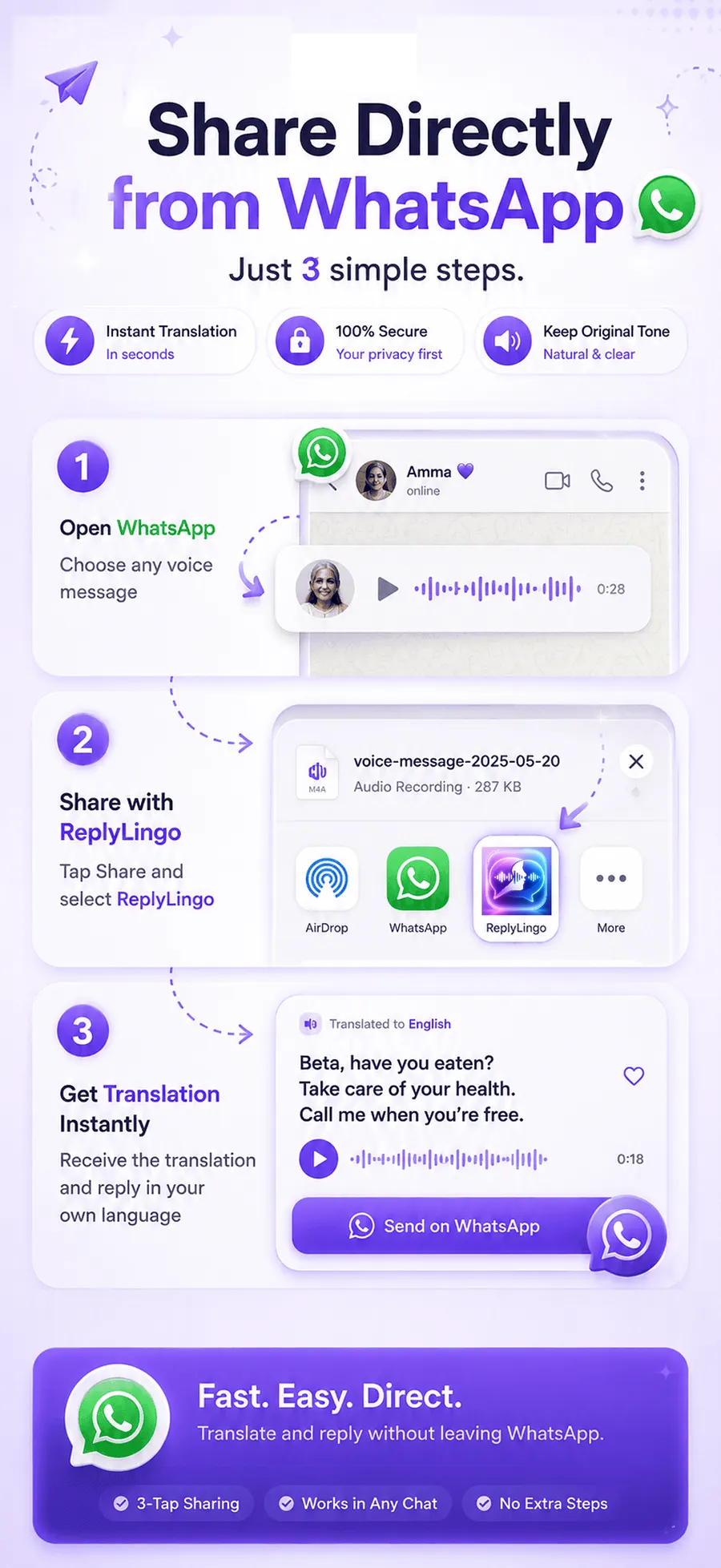
Four steps
- 1Install ReplyLingo from the App Store or Google Play and continue as a guest. No sign-up is needed.
- 2In the chat app, long-press the voice message, tap Share and choose ReplyLingo.
- 3Read the transcript and translation, and listen to the translation in your language.
- 4Record your reply in your own language, preview the translated voice, and send it back through the same chat.
Supported phones and apps
ReplyLingo is available for iPhone on the App Store and for Android on Google Play. It works through the normal share menu of each phone, so it works with WhatsApp, Telegram, iMessage and Signal, and with any other app that lets you share or save a voice message as an audio file.
Some apps keep voice messages inside the app and offer no Share, Forward or Save option. Instagram, Messenger and Viber are examples, and there ReplyLingo needs a workaround, which our guides explain.
Languages
ReplyLingo translates into 100+ languages (110 in the app's language list) and detects the spoken language automatically. Voice replies are available in 55 of them; in the others you get the translated text. The app's own screens are translated into many languages, including Arabic, French, German, Hindi, Italian, Dutch, Polish, Portuguese, Punjabi, Spanish, Turkish and Urdu.
You choose the language you want translations in under Preferred Translation Language in Settings.
Price and free plan
- Free to start: you get 3 free translations, reset every week, with no payment details.
- On the free plan, a reply you record ends with a short spoken ReplyLingo tag. Pro removes it.
- Pro is a subscription, billed through the App Store or Google Play. It removes the free limit. The current price, and any free trial available to you, is shown in the app before you subscribe, and it can differ by country.
- You can cancel at any time in your App Store or Google Play subscription settings.
Limits you should know about
- Voice messages work best up to about three minutes. For a longer one, ReplyLingo translates the first three minutes and tells you so.
- It needs an internet connection to translate or record. Past translations in History can be opened offline.
- Like any speech recognition, accuracy drops with background noise, fast speech, strong accents and mixed languages. Names, places and numbers are the words most worth double-checking. For money, health or legal details, confirm with the sender.
- The spoken reply uses a computer-generated voice. It is not a recording of your own voice.
Privacy
Your conversation history stays on your device, and ReplyLingo does not keep a server-side copy of your audio, transcripts or translations. The audio is sent to AI providers (OpenAI and Google Cloud) only for the moment it takes to process the translation you asked for. The full details are in the privacy policy.
Official website and contact
The official website is replylingo.com. The app is published on the App Store and Google Play under the name ReplyLingo. Questions and bug reports go through the support page.
Related guides
Frequently Asked Questions
Try ReplyLingo on your next voice message
Free to start. No sign-up needed. Continue as a guest.