
Guide
How to Translate a Voice Message from Any App
Whichever app the voice message came from, the method is the same. Here it is step by step, with the exact taps for the most common apps.
Last updated: October 2026
The short answer
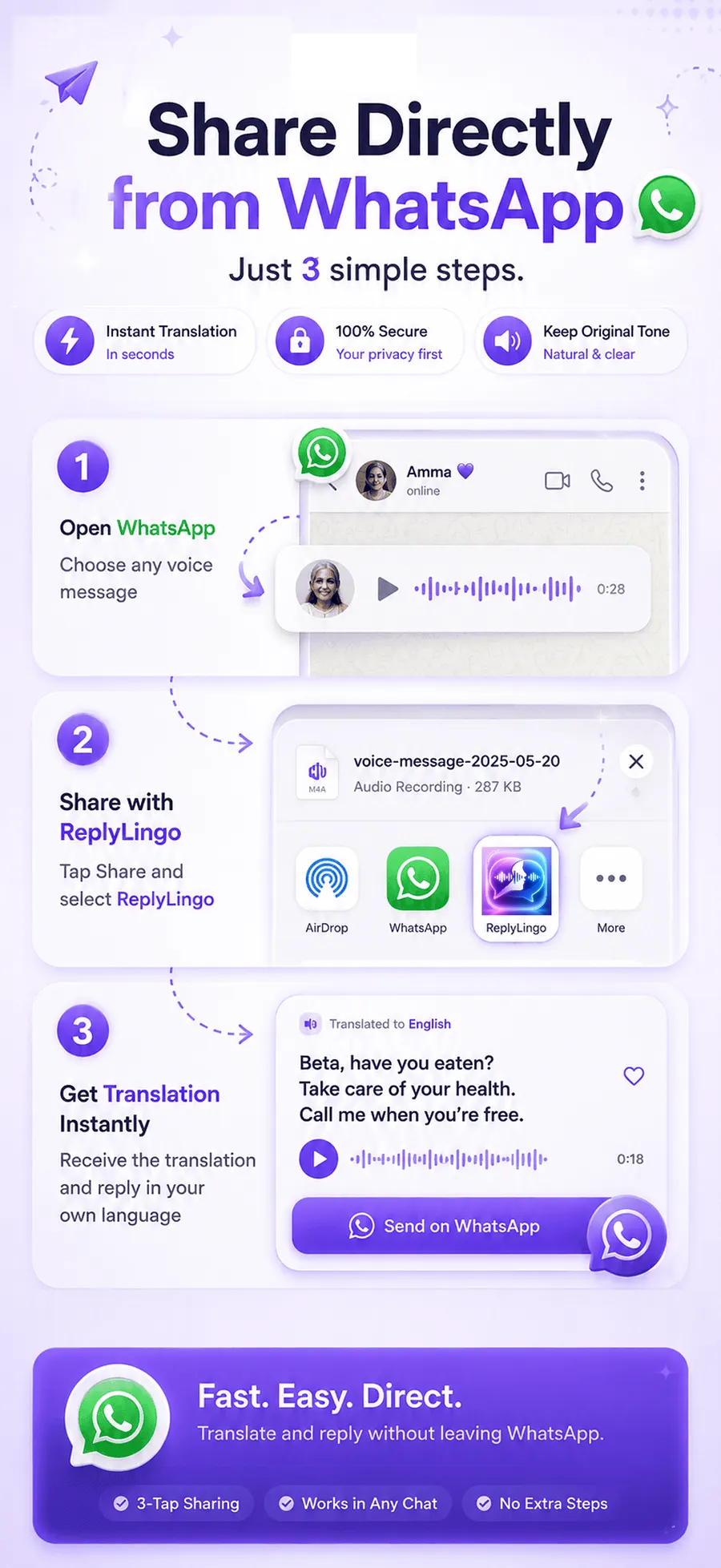
To translate a voice message, share the audio from the chat app to ReplyLingo. Long-press the voice message, tap Share, choose ReplyLingo, and within seconds you can read and hear it in your language. It works with any app that lets you share an audio file, on iPhone and Android.
The method in five steps
Works the same in every app
- 1Install ReplyLingo from the App Store or Google Play and continue as a guest. No sign-up is needed.
- 2In the chat app, long-press the voice message and tap Share (in some apps, Forward, then Share).
- 3Choose ReplyLingo from the share sheet.
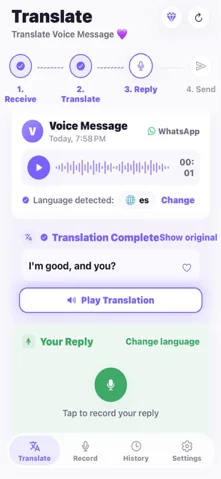
- 4ReplyLingo detects the spoken language, transcribes the voice message and translates it. This usually takes a few seconds.
- 5Read the transcript, listen to the translation in your language, and optionally record a reply.
The exact taps in each app
| App | What to do |
|---|---|
| Long-press the voice message, tap Share, choose ReplyLingo. | |
| Telegram | Press and hold the voice message, choose Forward or Share, pick ReplyLingo. |
| iMessage (iPhone) | Tap Keep on the audio message so it doesn't expire, then press and hold it, share it and choose ReplyLingo. |
| Signal | Save the voice message from the chat's media list, then share the saved file to ReplyLingo. |
| Instagram, Messenger, Viber | These apps document no Save or Share for a received voice message. Ask for a resend through another app, or use the per-app guides below. |
Guides for each app
Each app stores and shares voice messages differently. These guides say what each one does and how to get the audio into ReplyLingo.
What if the app has no Share option?
ReplyLingo can translate any voice message that reaches it as an audio file. Some apps keep voice messages inside the app and offer no Share, Forward or Save option. In that case no translation app can get to the audio.
Ask the sender to send it again through an app that does let you share audio, such as WhatsApp or Telegram, or to send the recording as a file.
Reply in the same language
After the translation you can record your answer in your own language. ReplyLingo translates it and speaks it in the language of the sender, then hands the audio back to your share sheet so you can send it in the same chat.
The manual way, and why it's slower
Without an app, you can play the voice message, type what you hear and paste it into a text translator. That is free, but it only works if you already understand most of the language, and it takes a lot longer than a share. It also gives you no way to answer by voice.
Tips for better results
- Voice messages of up to about three minutes work best. For a longer one, ReplyLingo translates the first three minutes and tells you so.
- Background noise lowers accuracy for any speech-to-text tool. A clear recording gives a clearer translation.
- For anything important, such as money, health or legal matters, double-check the key details with the sender.
Related guides
Frequently Asked Questions
Translate your next voice message
Free to start. No sign-up needed. Continue as a guest.