
Guide
Translate a Hindi voice message to Punjabi (and Punjabi to Hindi)
Hindi and Punjabi speakers often share a family but not a script. Here is how to understand a voice note in one and answer in the other.
Last updated: November 2026
The short answer
To translate a Hindi voice message into Punjabi, set Punjabi as your Preferred Translation Language in ReplyLingo's Settings, then share the voice message to ReplyLingo from WhatsApp or Telegram. It detects Hindi, writes out what was said and gives you the Punjabi translation as text and audio. To go the other way, choose Hindi and share the Punjabi voice note.
Hindi to Punjabi in six steps
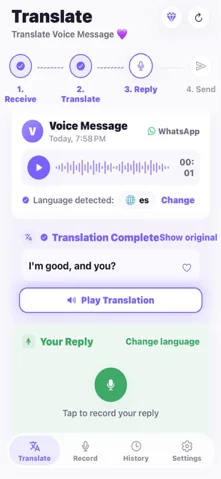
Understand the Hindi voice note in Punjabi
- 1Install ReplyLingo from the App Store or Google Play and continue as a guest.
- 2Open Settings and choose Punjabi as your Preferred Translation Language.
- 3In WhatsApp or Telegram, long-press the Hindi voice message and tap Share.
- 4Choose ReplyLingo from the share sheet.
- 5Read the Punjabi translation and listen to it. Tap Show original to see the Hindi transcript.
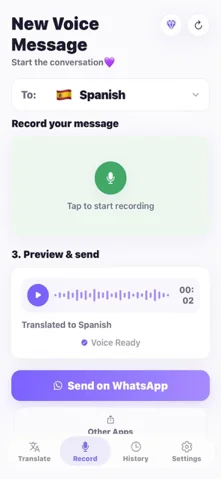
Answer in Punjabi, they hear Hindi
- 1Record your reply in Punjabi.
- 2ReplyLingo translates it and speaks it in Hindi, the language of the sender it detected.
- 3Send the audio back through the same chat from your share sheet.
Why Hindi and Punjabi are not the same
Hindi and Punjabi share many words and many families speak both, but they are different languages with different scripts: Hindi is written in Devanagari, and Punjabi in Gurmukhi in India or Shahmukhi in Pakistan. A relative who is comfortable speaking Hindi may not read Gurmukhi, and the other way round. Voice notes get around the script problem, but you can still be left with a message you only half follow.
ReplyLingo goes straight from the audio to the language you chose, so you do not have to read either script, and you do not have to pass through English.
Punjabi to Hindi
Choose Hindi as your Preferred Translation Language in Settings, share the Punjabi voice message, and the Hindi translation appears as text and audio. Your reply is recorded in Hindi and spoken back in Punjabi.
How accurate is it?
ReplyLingo detects the spoken language automatically, and clear everyday speech is generally handled well. Hindi and Punjabi speakers often mix in Urdu and English words, and regional speech differs, so mixed-language sentences, fast talking and background noise lower accuracy, as they do for any speech-to-text system.
Names of people, villages and shops are the words most worth double-checking. For money, health or legal details, confirm the important parts with the sender in a quick reply.
Tips
- If someone sends a very long voice note, ask them to split it into clips of a minute or two. ReplyLingo works best with messages of up to about three minutes.
- A quiet recording gives a clearer translation.
- The app screens are also available in Hindi and Punjabi, so you can use ReplyLingo entirely in the language you read best.
Related guides
Frequently Asked Questions
Understand the next Hindi or Punjabi voice note
Free to start. No sign-up needed. Continue as a guest.