
Guide
How to Reply to a Voice Message in Another Language
Understanding a voice note is half of it. Here is how to answer it out loud, in the other person's language, without typing.
Last updated: October 2026
The short answer
To reply to a voice message in another language, record your answer in your own language in ReplyLingo. It translates your reply and speaks it in the sender's language, you listen to a preview, and you send the translated voice message back through WhatsApp or any chat app from your share sheet.
Reply to a voice note in five steps
From their voice note to your answer
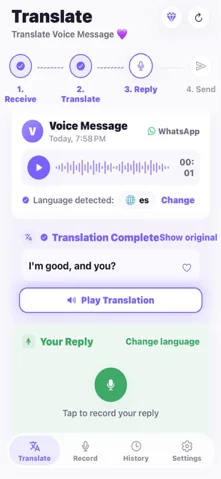
- 1Share the voice message you received to ReplyLingo and read or listen to the translation. ReplyLingo detects the language the sender spoke.
- 2Tap the record button and speak your reply in your own language, at a normal pace.
- 3Stop recording. ReplyLingo translates your reply into the sender's language. The screen tells you which language it will use.
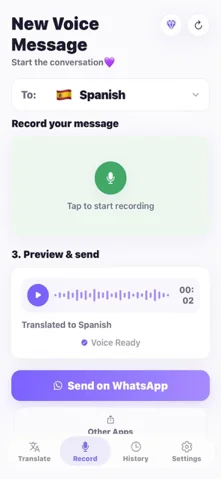
- 4Play the preview to hear the translated voice message before it goes anywhere.
- 5Tap send and pick the chat from your share sheet. The reply goes back as a voice message.
What the other person receives
They get an ordinary voice message in their language, in the same chat as before. They don't need ReplyLingo or any other app. The voice is computer-generated, so it is not a recording of your own voice, and they hear the translated wording rather than your original.
Starting a conversation instead of replying
You don't have to wait for a voice message. Open the record screen in ReplyLingo, choose the language you want to speak to the other person in, record what you want to say, and send the translated voice message to any chat.
Why reply by voice instead of typing
- It sounds like a conversation. A short voice message feels warmer than a translated block of text.
- It's faster. Speaking is quicker than typing, and you skip the copy-and-paste between a translator and your chat app.
- It keeps the chat in the same format. If they send voice notes, they get voice notes back.
- It helps when the other person isn't comfortable reading, for example an older relative who prefers to listen.
Tips for a reply that translates well
- Speak naturally at a normal pace. There is no need to talk slowly or use simple words.
- Keep each reply to one or two topics. A short reply translates more cleanly than a long one.
- Record somewhere quiet. Background noise lowers accuracy for any speech-to-text system.
- Always play the preview first. If something sounds wrong, record the reply again.
- For important details, such as dates, amounts and addresses, say them clearly and confirm them in a follow-up.
Related guides
Frequently Asked Questions
Answer your next voice message in their language
Free to start. No sign-up needed. Continue as a guest.