
Guide
How to translate a Viber voice message
Viber is popular in Poland, Ukraine and across Eastern Europe, but it has no translate button for voice messages. Here is what it offers and what you can do about it.
Last updated: October 2026
Based on Viber's Help Center as read in October 2026.
The short answer
Yes, with a workaround. Viber translates text messages but not voice messages, and its Help Center lists no Save or Share option for a voice message on a phone. The practical routes are to find the file on Viber for computer, where received voice messages are kept in a folder, or to ask for the message again through WhatsApp or Telegram, then share the audio to ReplyLingo.
What Viber does with voice messages
- Translate: touch and hold a message and tap Translate. Viber describes this as translating the message for you only; it does not say voice messages are included.
- Voice to text: Viber Plus subscribers can transcribe a received voice message with the transcribe icon in the bubble. Viber says this is currently only on iOS, needs an internet connection, is limited to 7,000 characters, and uses the languages of iOS dictation. The transcript stays in the spoken language.
- Saving: on a phone, the long-press menu in Viber's Help Center shows Reply, Copy, Forward, Translate, Pin and Delete. Download and Save as are listed as options for Viber on a computer.
- On a computer: Viber says all photos, videos and voice messages received are saved in a folder you can see in the desktop settings. Media you never open is deleted after 14 days.
Get a Viber voice message into ReplyLingo
Option 1: from Viber on a computer
- 1Open Viber on your computer and let the voice message download by opening it.
- 2In Viber's settings on the computer, open the media folder shown there and find the new file.
- 3Send the file to your phone by email or cloud storage and open it.
- 4Tap Share and choose ReplyLingo.
Option 2: ask for it again
- 1Ask the sender to send the voice message through WhatsApp or Telegram, or as an audio file.
- 2Touch and hold it there, tap Share and choose ReplyLingo.
Option 3: record the playback
- 1Play the voice message in Viber with the volume up.
- 2Record it with Voice Memos on iPhone, or with Google Recorder or Samsung Voice Recorder on Android.
- 3Open the recording, tap Share (in Voice Memos: More, then Share) and choose ReplyLingo.
What does not work
- Viber does not document the audio format of its voice messages. If ReplyLingo cannot open a file from the computer folder, use option 2 or 3.
- Playback recordings pick up room noise. Check names, dates and amounts with the sender.
- ReplyLingo works with clips of about three minutes. A longer file is cut to three minutes or not accepted, depending on the format.
- Viber Plus voice to text is a paid feature, not on every country's Viber, and it does not translate.
A typical case: a message in Ukrainian or Russian
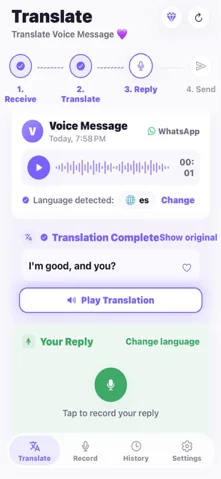
A person in Poland, Romania or Bulgaria gets a Viber voice message from a Ukrainian-speaking colleague or neighbour. Viber's Plus transcript would only give Ukrainian text. With the audio in ReplyLingo you get the transcript, the translation in your language, and an answer you can speak in yours and send in theirs.
Related guides
Frequently Asked Questions
Understand your next Viber voice message
Free to start. No sign-up needed. Continue as a guest.