
Comparison
Google Translate vs ReplyLingo for voice messages
Google Translate is a great general translator. A voice note someone already sent you is a different job. Here is where each tool fits.
Last updated: November 2026
We describe Google Translate from public information and our own testing. Its features change, so check the app for what it offers today.
The short answer
Use Google Translate for typed text, signs and live back-and-forth conversation. Use ReplyLingo when someone has already sent you a voice message in a language you do not speak: you share the audio to ReplyLingo, read and hear the translation, and reply by voice in the sender's language. We found no way to hand Google Translate an audio file you already received, so with it you would have to type out the words yourself first.
What Google Translate does well
If you can type or paste the words you want translated, Google Translate is usually the simplest tool, and it costs nothing.
- Translating typed or pasted text between a very large number of languages, for free.
- Translating text in photos and signs with the camera.
- Live conversation between two people on one phone.
- Quick lookups of words and phrases.
Where a voice message is different
A voice message from WhatsApp or Telegram is a finished audio file sitting inside another app. To use a text translator on it, you first need the words written down, and if you do not understand the language, you cannot write them down.
Google Translate's speech features are built around live speech into the phone's microphone. We could not find an official Google page describing a way to import an audio file you received, so check its current features before relying on it for this.
What ReplyLingo adds
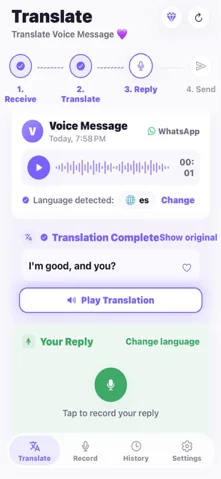
- It receives the voice message directly from your share sheet, so there is nothing to type or copy.
- It detects the spoken language, so you do not have to know what it is.
- It writes out the original, translates it into your language and reads the translation aloud.
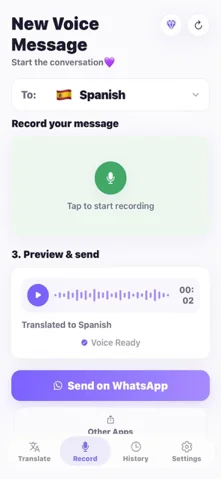
- It lets you record a reply in your own language and speaks it in the sender's language, ready to send back as a voice message.
Side by side
| Google Translate | ReplyLingo | |
|---|---|---|
| Best for | Typed text, camera, live conversation | Voice messages you received |
| Takes a received voice message from WhatsApp or Telegram | No way found to import one | Yes, through the share sheet |
| Detects the language of the audio | Not for a received file | Yes, automatically |
| Spoken translation | For text and live speech | Yes, for the voice message |
| Voice reply in the sender's language | No | Yes, as a voice message to send back |
| Live conversation between two people | Yes | No, built for recorded messages |
| Price | Free | 3 free translations, reset every week; Pro removes the limit |
Which should you use?
ReplyLingo's free plan is limited: you get 3 free translations, reset every week, and a Pro subscription removes the limit. If you only get a voice note once in a while and can follow some of the language, the manual route of writing out what you hear and pasting it into Google Translate costs nothing.
- Typed message, a sign, a menu or a face-to-face conversation: Google Translate.
- A WhatsApp, Telegram or iMessage voice note in a language you do not speak: ReplyLingo.
- Both: many people keep Google Translate for text and use ReplyLingo for voice notes.
Related guides
Frequently Asked Questions
Try ReplyLingo on the next voice note you get
Free to start. No sign-up needed. Continue as a guest.