
Guide
Voice Translator App: Understand and Answer in Any Language
A voice translator that works on the audio you already receive: it listens, translates, reads the result aloud and speaks your answer in the other person's language.
Last updated: November 2026
The short answer
ReplyLingo is a voice translator app for iPhone and Android: share a voice message into it and it transcribes the speech, translates it into your language and reads it aloud, usually in a few seconds. Then you record your answer in your own language and it speaks the translation in theirs. It translates into 100+ languages, with voice replies in 55, and it is free to try.
What this voice translator does
Most translators start from typed text. A voice translator starts from sound: the speech has to be recognised, translated and, ideally, spoken back. ReplyLingo does the three steps in one pass, so you do not type anything and you do not paste text between apps.
It is built around recorded voice messages, the kind people send on WhatsApp, Telegram and similar apps, rather than live interpreting. That focus is why it can reply for you as well: the answer you record is translated and returned as a voice message.
How to use it, step by step
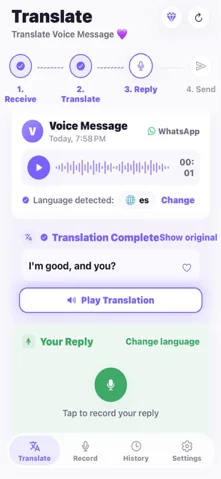
Understand a voice message
- 1Install ReplyLingo from the App Store or Google Play. You can continue as a guest.
- 2In the chat, long-press the voice message and tap Share, then pick ReplyLingo.
- 3The spoken language is detected for you. Read the transcript and listen to the translation.
- 4Tap Show original if you want to see the words in the language that was spoken.
Answer by voice
- 1Record your reply in your own language, at a normal pace.
- 2ReplyLingo translates it and speaks it in the sender's language. Play the preview first.
- 3Send the voice message back in the same chat from your share sheet.
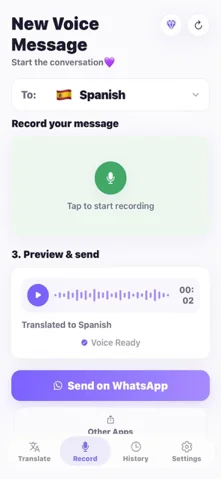
Start a conversation yourself
- 1Open the Record tab and choose the language the other person speaks.
- 2Record what you want to say in your language.
- 3Send the translated voice message to any chat.
What it does and does not cover
| You want to | ReplyLingo | Typical alternative |
|---|---|---|
| Understand a voice note you received | Yes, share it in | Type it out, then use a text translator |
| Answer with a voice message | Yes, in the sender's language (55 voice languages) | Type the reply and send text |
| Interpret a live face-to-face conversation | Not its purpose | A conversation mode in a general translator |
| Translate a phone call as it happens | No | Not supported by ReplyLingo |
Limits worth knowing
- The spoken translation is a computer-generated voice, not a recording of your own voice.
- It works best on voice messages of up to about three minutes. Longer ones are cut to the first three minutes.
- Background noise lowers accuracy, as with any speech recognition. Check names, numbers and addresses.
- It needs an internet connection to translate and record. Past translations in History can be replayed offline.
Free to try, and what happens next
ReplyLingo starts free with 3 free translations, reset every week, and no payment details are needed to start. A Pro subscription removes the limit, and new subscribers get a 3-day free trial. The current price is shown in the app before you subscribe.
Related guides
Frequently Asked Questions
Try the voice translator on your next voice message
Free to start. No sign-up needed. Continue as a guest.