
Guide
How to Make a Multilingual Voicemail Greeting
You speak only your own language. ReplyLingo turns the message into a spoken version in each other language, ready to share.
Last updated: November 2026
The short answer
To make a voicemail greeting in several languages, record your message in your own language in ReplyLingo's Record tab, choose the language you want, and play the translated voice message it produces. Repeat with the next language, then share each audio file. ReplyLingo makes the audio; whether you can upload it as your voicemail greeting depends on your carrier or phone system.
What you can and cannot do
- You can create a spoken version of your greeting in each language ReplyLingo offers voice replies in (55 languages), without speaking those languages yourself.
- You always record in your own language. ReplyLingo does not reuse one recording for several languages: pick the language, record, and repeat for the next.
- ReplyLingo does not set your voicemail greeting for you. Carriers and business phone systems each have their own way: some accept an uploaded audio file, others only record over a phone call.
- The voice is computer-generated. It will not sound like you.
Step by step
Make one version per language
- 1Keep the greeting short: your name or business, when you call back, and what to do next. A short script translates more cleanly.
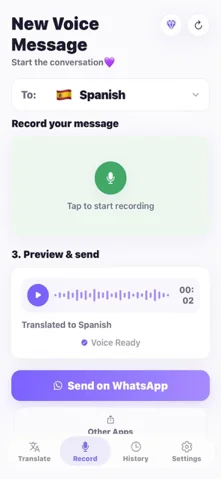
- 2Open ReplyLingo and go to the Record tab. Tap the language picker and choose the language of the first version.
- 3Tap to start recording and read your greeting in your own language at a normal pace.
- 4Stop and wait a few seconds. Play the preview of the translated voice message.
- 5If something sounds wrong, record again. Numbers, names and addresses deserve a second listen.
- 6Share the audio to Files, email or another app so you can keep it. Repeat from step 2 with the next language.
Getting the greeting onto your voicemail
Check your carrier's voicemail settings or your business phone system first. If it lets you upload an audio file, use the file you saved. If it only records by phone, ReplyLingo cannot enter the audio for you; ask your provider whether a file upload is available.
A single greeting that plays several languages one after another needs the audio joined into one file, which ReplyLingo does not do. Some phone systems offer a separate greeting per language or a language menu instead.
Other places to use the same audio
- A welcome voice message for customers or guests who speak another language.
- A short voice note sent in a chat or by email, in the other person's language.
- An announcement for a shared household, a class or a small team.
Related guides
Frequently Asked Questions
Make your greeting in another language
Free to start. No sign-up needed. Continue as a guest.