
Guide
How to translate a Signal voice message
Signal has no translate button for voice messages, but it does let you save the audio. Here are the exact steps for iPhone and Android, and a note on privacy.
Last updated: October 2026
Based on Signal's Support Center as read in October 2026.
The short answer
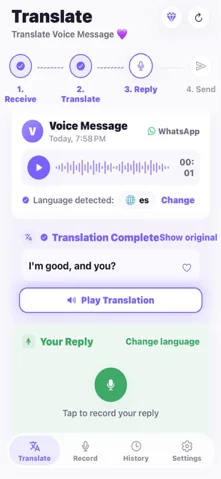
Yes. Signal does not translate voice messages itself, but it lets you save the audio from the chat's media list; you can then share the saved file to ReplyLingo and read and hear it in your language. On iPhone use the share icon and Save Audio, on Android the three-dot menu and Save.
What Signal offers for voice messages
Signal's Support Center explains how to view and save media and files, including voice messages. It lists no built-in transcription or translation for voice messages, so the job is to get the audio out of Signal first.
Save a Signal voice message and translate it
On iPhone
- 1Open the chat and tap the contact name to open the chat settings.
- 2Choose All Media, then the Audio tab.
- 3Select the voice message and tap the share icon, then Save Audio. A quicker way is to press and hold the message in the chat, tap the share icon and choose Save Items.
- 4Open the saved audio in the Files app, tap Share and choose ReplyLingo.
On Android
- 1Open the chat, tap the contact name, then tap Shared media.
- 2Select Audio and open the voice message.
- 3Tap the three-dot button, then Save.
- 4Open the saved file in your Files app, tap Share and choose ReplyLingo.
A word about privacy
Signal chats are end-to-end encrypted. A voice message you save is a normal file on your phone, outside Signal, and when you share it to ReplyLingo it is sent to OpenAI and Google Cloud while it is being transcribed and translated. ReplyLingo keeps no server-side copy afterwards and your history stays on your device, but if the content is highly sensitive, think before you share it.
What does not work
- The saved audio is a file, so ReplyLingo can only translate it as a recording. Signal does not state which audio format it saves; if a file does not open in ReplyLingo, tell the sender to resend it as a WhatsApp or Telegram voice message.
- ReplyLingo works with clips of about three minutes. A longer file is cut to the first three minutes or declined, depending on the format.
- On iPhone ReplyLingo takes one file at a time, so translate several messages one after the other.
Related guides
Frequently Asked Questions
Understand your next Signal voice message
Free to start. No sign-up needed. Continue as a guest.