
Guide
How to translate a Facebook Messenger voice message
Messenger has a Transcribe option for voice messages, but it stays in the language spoken. Here is what it covers and how to get a translation.
Last updated: October 2026
Based on Messenger's Help Center as read in October 2026.
The short answer
Yes, with a workaround. Messenger can transcribe a voice message you received (touch and hold it, then tap Transcribe) but it does not translate it, and its Help Center describes no Save or Share-to-other-apps option for voice messages. To translate one with ReplyLingo, get the audio as a file: ask for it again through WhatsApp or Telegram, or record it with your phone's voice recorder while it plays.
What Messenger does with voice messages
- Transcribe: touch and hold a voice message you received and tap Transcribe. The text appears below it and only you see it. The feature is rolled out gradually, so it may be missing on your phone.
- Languages: Messenger's Help Center lists a set of languages for transcripts, including English, Spanish, French, German, Italian, Portuguese, Polish, Turkish, Dutch and Russian. Ukrainian was not on the list when we checked.
- Privacy: Meta says a voice message you transcribe is shared with Meta to produce the text, including in end-to-end encrypted chats.
- Forward: touch and hold a message, tap More, then Forward. This sends it to another Messenger chat only. It does not give you an audio file.
- Saving: we found no Messenger Help Center article about saving a received voice message to your phone.
Translate a Messenger voice message with ReplyLingo
Option 1: the sender uses another app
- 1Ask the sender to record it again in WhatsApp or Telegram, or to send it as an audio file.
- 2Touch and hold the message there, tap Share and choose ReplyLingo.
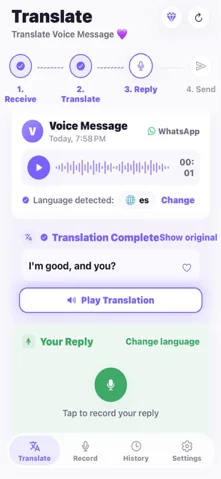
- 3ReplyLingo detects the language, transcribes it and plays the translation.
Option 2, iPhone: record the playback
- 1Play the Messenger voice message with the volume up.
- 2Record it with the Voice Memos app in a quiet room.
- 3Open the recording in Voice Memos, tap More, then Share, and choose ReplyLingo.
Option 2, Android: record the playback
- 1Play the voice message in Messenger with the volume up.
- 2Record it with Google Recorder, Samsung Voice Recorder or another recorder app.
- 3Touch and hold the recording, tap Share and choose ReplyLingo (in Google Recorder: Share File, then Audio).
Limits to know about
- Recording from a speaker adds room noise, which lowers accuracy. Check names, numbers and places with the sender.
- ReplyLingo works with clips of up to about three minutes. Longer files are cut to the first three minutes, or not accepted for some recording formats.
- On iPhone ReplyLingo takes one audio file at a time.
- Messenger's audio messages are not available for every account, so the steps above depend on what your app shows.
Transcript or translation: which do you need?
If you can read the language the person spoke, Messenger's Transcribe may be all you need. If you cannot, a transcript in the same language leaves you where you started. ReplyLingo writes out the speech, translates it into your language and reads it aloud, and it can also turn your answer into a voice message in theirs.
Related guides
Frequently Asked Questions
Understand your next Messenger voice message
Free to start. No sign-up needed. Continue as a guest.