
Guide
How to Translate a WhatsApp Voice Message on Android
Got a voice note in a language you don't speak? Here is what your Android phone can do on its own, and the quickest way to understand it and answer back.
Last updated: October 2026
The short answer
Android has no built-in way to translate a WhatsApp voice message into your language. Long-press the voice message in WhatsApp, tap Share, choose ReplyLingo, and read and hear the translation in a few seconds. ReplyLingo is on Google Play, free to start.
What Android and WhatsApp can and can't do on their own
- WhatsApp's message translation works on typed text messages, not on voice notes.
- WhatsApp's Voice Message Transcripts turn speech into text in the same language that was spoken, and only for a limited set of languages.
- Google Translate handles typed text and live conversations. It can't take a voice note you already received in WhatsApp and translate it.
- Typing out what you heard and pasting it into a translator only works if you already understand the language.
Translate a WhatsApp voice message on Android, step by step
Six steps with ReplyLingo
- 1Install ReplyLingo from Google Play and continue as a guest. No sign-up is needed.
- 2In WhatsApp, long-press the voice message and tap Share. On some WhatsApp versions Share is in the three-dot menu at the top.
- 3Choose ReplyLingo from the Android share menu.
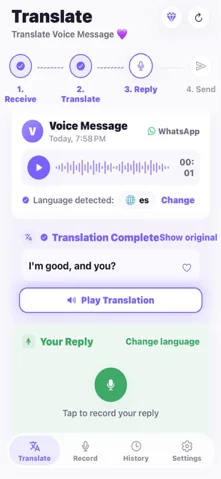
- 4ReplyLingo detects the spoken language, so you don't need to know what it is.
- 5Read the transcript and listen to the translation in your language. It usually takes a few seconds.
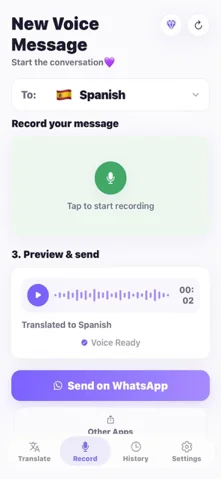
- 6Record your reply in your own language, preview it, and send the translated voice message back through WhatsApp.
If ReplyLingo isn't in your share menu
ReplyLingo registers as a place to send audio files, so it appears in the Android share menu next to your other apps. If you don't see it right away, scroll the share menu sideways or tap More. Android sometimes puts recently used apps first, and the layout of the share menu differs between phone makers.
Make sure you are sharing the voice message itself: long-press the audio bubble, not a text message.
Translate Telegram and other voice messages on Android
The flow is the same for any app that lets you share an audio file. In Telegram, press and hold the voice message, choose Forward or Share, and pick ReplyLingo.
Reply with a voice message in their language
Understanding the message is only half of it. With ReplyLingo you record your reply in your own language. It translates the reply and speaks it in the other person's language, and you send the audio back to the chat from the Android share menu. The other person hears an answer in their language.
Tips for clearer translations on Android
- Short, single-topic voice messages translate more cleanly than long ones. ReplyLingo works best with voice notes of up to about three minutes.
- Background noise lowers accuracy, as it does for any speech-to-text system.
- For anything important, such as money, health or legal matters, double-check the key details with the sender.
Related guides
Frequently Asked Questions
Translate your next voice message on Android
Free to start. No sign-up needed. Continue as a guest.