
Guide
How to translate an Instagram voice message
Instagram turns a voice message in your DMs into text, but only in the language it was spoken. Here is what the app really offers and the practical ways to get a translation.
Last updated: October 2026
Based on Instagram's Help Center as read in October 2026.
The short answer
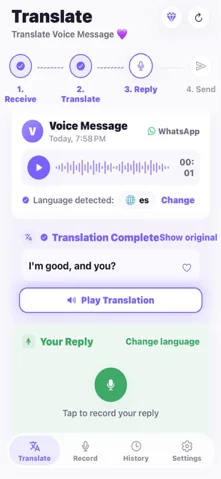
Yes, with a workaround. Instagram does not translate voice messages itself, and its Help Center describes no Share or Save button for a voice message you received, so ReplyLingo needs the audio to reach it as a file: ask the sender to resend it through WhatsApp or Telegram, or record the message with your phone's voice recorder as it plays and share that recording to ReplyLingo.
What Instagram does with voice messages
- Transcription: below a voice message there is a View transcription button. It writes out what was said in the same language as the recording.
- Translation: Instagram's Translate option (touch and hold a message, then tap Translate) is described by Instagram for text messages, on iPhone and Android. Nothing in the Help Center says it works on voice messages or their transcripts.
- Saving or forwarding: Instagram's Help Center has no article that lets you save a received voice message to your phone or share it to another app. Methods you find online that rely on browser tools or extensions are not Instagram features, so we do not recommend them.
Get an Instagram voice message into ReplyLingo
Easiest: ask for it again
- 1Ask the sender to send the same message through WhatsApp or Telegram, or as an audio file.
- 2Long-press it there, tap Share and choose ReplyLingo.
- 3ReplyLingo detects the language, transcribes it and plays the translation.
On iPhone: record it as it plays
- 1Open the Instagram chat and start the voice message with the volume up.
- 2Record it with the Voice Memos app, in a quiet place with the phone close to the speaker.
- 3In Voice Memos tap the recording, then the More button and Share, and choose ReplyLingo.
On Android: record it as it plays
- 1Play the voice message in Instagram with the volume up.
- 2Record it in a quiet room with your phone's recorder app, such as Google Recorder or Samsung Voice Recorder, or with a second phone.
- 3In the recorder, touch and hold the recording, tap Share and choose ReplyLingo (in Google Recorder pick Share File, then Audio).
What does not work well
- A recording made from the speaker also picks up room noise, so accuracy drops. Names, numbers and addresses are the first things to go wrong; double-check them with the sender.
- ReplyLingo handles voice messages of about three minutes. A longer clip is translated up to the first three minutes, or declined for some recording formats, so keep recordings short.
- Instagram's own transcript only reads what was said. If you do not read that language, it does not help on its own.
- Only record conversations you are part of, and keep other people's voice messages private.
Reply in their language
Once you understand the message, record your answer in your own language inside ReplyLingo. It translates your reply and speaks it in the sender's language, and hands the audio to the share sheet so you can send it back in the chat.
Related guides
Frequently Asked Questions
Understand your next Instagram voice message
Free to start. No sign-up needed. Continue as a guest.