
Guide
Can WhatsApp Translate Voice Messages?
What WhatsApp does and doesn't do with voice notes in 2026, and the simplest way to understand one in another language and answer back.
Last updated: October 2026
The short answer
No, not fully. WhatsApp can transcribe voice messages into text in the same language and can translate text messages, but it cannot translate a voice message into another language or let you reply with a voice message in the other person's language. To do both, use an app like ReplyLingo.
What can WhatsApp do built-in?
WhatsApp has two features that come close, but neither translates a voice note.
Message translation (text only)
- Announced by WhatsApp on 23 September 2025. Long-press a message, then tap Translate.
- Works in one-to-one chats, groups and Channels.
- Android launched with 6 languages: English, Spanish, Hindi, Portuguese, Russian and Arabic. iPhone supports 19+ languages.
- Translation happens on your device.
Voice message transcripts (same language only)
- Turns speech into text in the same language. It does not translate.
- On iPhone: Settings → Chats → Voice message transcripts, then choose Automatic, Manual or Off.
- Language support for transcripts is limited and differs by phone. On iPhone, transcripts use Apple's speech recognition (about 20 languages on iOS 17+). On Android, support started with just English, Portuguese, Spanish and Russian in late 2024 and has slowly expanded (Arabic, Hindi and more, with extra languages in beta as of September 2026). Many languages, such as Punjabi, Urdu or Bengali, may still not be available, and in every case the transcript stays in the same language as the voice note. It is not a translation.
What can't WhatsApp do?
WhatsApp can't translate a voice note directly. A transcript of Spanish speech is still Spanish, so it doesn't help if you don't read Spanish.
WhatsApp also can't turn your reply into a voice message in the other person's language. You would have to translate and record it yourself.
Here is the difference at a glance.
| Feature | WhatsApp built-in | ReplyLingo |
|---|---|---|
| Translate typed messages | ✅ Yes | ❌ Not its focus |
| Transcribe a voice note (same language) | ✅ Yes | ✅ Yes |
| Translate a voice note into your language | ❌ No | ✅ Yes |
| Hear the translation read aloud | ❌ No | ✅ Yes |
| Reply by voice in their language | ❌ No | ✅ Yes |
How do I translate a WhatsApp voice message and reply by voice?
Four steps with ReplyLingo
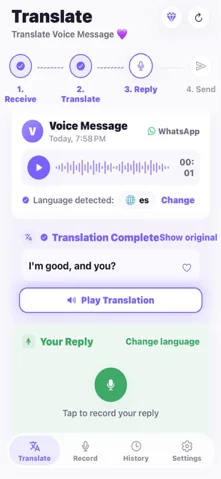
- 1Long-press the voice note in WhatsApp, tap Share or Forward, and choose ReplyLingo.
- 2Read the translation or listen to it in your language. The spoken language is detected for you.
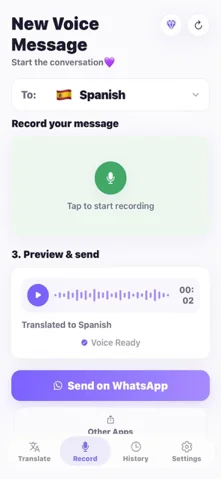
- 3Record your reply in your own language.
- 4ReplyLingo translates it and sends it back as a voice message in their language.
Who needs to translate WhatsApp voice notes?
Anyone who gets voice notes in a language they don't speak well. Typed translation doesn't help here, because there is no text to translate.
- Family and in-laws who prefer talking to typing.
- Couples who live in different countries.
- Clients, suppliers and coworkers who send voice notes for work.
- Expats and travellers dealing with landlords, drivers or hosts.
Related guides
Frequently Asked Questions
Translate and reply to WhatsApp voice notes
Free to start. No sign-up needed. Continue as a guest.