
Guide
How to find out what language a voice message is in
A voice note arrives and you cannot tell if it is Portuguese or Spanish, Hindi or Urdu. Here is how to find out, and then understand it.
Last updated: November 2026
The short answer
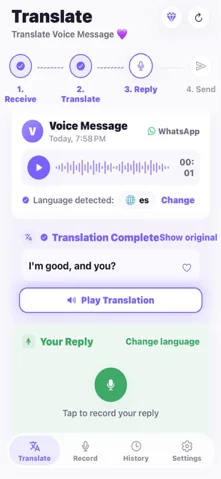
To find out what language a voice message is in, share it to ReplyLingo. It detects the spoken language automatically and shows it on screen as "Language detected", then transcribes the audio and translates it into your language. You do not need to know the language beforehand.
Find the language in five steps
From unknown audio to a named language
- 1Install ReplyLingo from the App Store or Google Play and continue as a guest.
- 2In your chat app, long-press the voice message and tap Share.
- 3Choose ReplyLingo from the share sheet.
- 4Wait a few seconds. The detected language appears on screen.
- 5Read the translation in your language, or tap Show original to see the transcript in the detected language.
Why it is hard to tell by ear
Related languages sound alike. Spanish and Portuguese, Hindi and Urdu, Russian and Ukrainian, or Indonesian and Malay can be hard to tell apart if you do not speak any of them. Names and loanwords in a message can also mislead you.
Typing a guess into a translator does not help, because you cannot type words you do not understand. Detecting the language from the sound itself is what makes the next step possible.
What you can and cannot rely on
- Clear, everyday speech is generally detected well.
- Very short clips, heavy background noise or music make detection less reliable.
- Messages that mix two languages may be detected as just one of them.
- Detection is for spoken voice messages. It is not a tool for identifying a song or a written text.
Other ways to identify a language, and their limits
- Ask the sender. Often the quickest, if you can reach them.
- Listen for names, places or numbers and search them. This only narrows it down.
- Paste a written transcript into a text language detector. You need the words written down first, which is the hard part.
Related guides
Frequently Asked Questions
Find out what language that voice note is in
Free to start. No sign-up needed. Continue as a guest.