
Comparison
ReplyLingo vs Hearless: which voice note app should you use?
Both start from the WhatsApp share sheet, but they do different jobs. Hearless writes a voice note out as text; ReplyLingo translates it and lets you answer in the other language.
Last updated: 24 November 2026
We make ReplyLingo. Hearless facts come from its Google Play listing, read on 24 November 2026. Apps change, so check its listing before you decide.
The short answer
Choose ReplyLingo if you need to understand a voice note in a language you do not speak and answer it: it detects the language, shows the transcript and the translation, reads the translation aloud and lets you reply by voice in the sender's language. Choose Hearless if you only need the voice note written out as text in the language it was spoken, or you want voice typing: its listing describes speech to text in 65 languages, with pay-per-minute packs instead of a subscription, and does not describe translation.
Our verdict: choose ReplyLingo if…
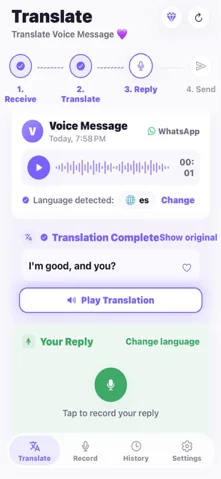
- You need a translation, not just a transcript. ReplyLingo detects the spoken language and translates it into yours (100+ languages), shows the original transcript under Show original, and reads the translation aloud.
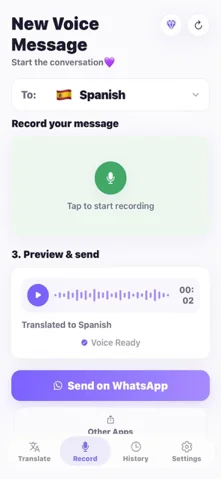
- You want to answer back in their language. Record your reply in your own language, check the preview, and share the translated audio into the chat (spoken replies in 55 languages).
- You use an iPhone. ReplyLingo is on iPhone and Android; the Hearless listing we read is on Google Play.
- You want to try it with no setup: free to start with 3 free translations a week, and you continue as a guest.
Choose Hearless if…
- You only want to read what was said, in the same language. Its listing says it turns voice notes into punctuated text in 65 languages, and it does not describe translation.
- You want voice typing in WhatsApp or any app. Hearless adds a microphone next to the text box so you can dictate, which ReplyLingo does not do.
- You read Urdu, Hindi, Punjabi, Arabic or Persian in Roman letters. Hearless lists a Roman script option (for example Roman Urdu) with Show Original for the native script.
- You prefer paying for minutes instead of a subscription. Its listing says new accounts get 2 free minutes, minutes packs never expire and there is no subscription.
How the two compare in practice
The first steps are the same: long-press a voice message, tap Share, and choose the app. After that they split. Hearless gives you a transcript you can read in seconds. ReplyLingo gives you the translation, a spoken version of it, and a way to reply in the other person's language.
If your problem is "I cannot listen right now", a transcript is enough. If your problem is "I do not understand this language", you need a translation, and for a conversation you also need to answer, which is what ReplyLingo is built for.
Sources
Hearless facts come from its Google Play listing, read on 24 November 2026 (developer listed as Talha Dev, listing updated 15 November 2026). We did not find a Hearless App Store listing. ReplyLingo facts come from the ReplyLingo app and this site.
ReplyLingo vs Hearless at a glance
Hearless's column is based on its Google Play listing, read on 24 November 2026. "Not shown" means the listing does not say.
| Feature | ReplyLingo | Hearless |
|---|---|---|
| Take a voice note from the share sheet | Yes (WhatsApp, Telegram, any app that shares audio) | Yes (WhatsApp, WhatsApp Business, Telegram, Instagram, Signal, any app that shares audio) |
| Translate into another language | Yes, 100+ languages | Not described (speech to text) |
| Transcript in the spoken language | Yes, under Show original | Yes, in 65 languages |
| Reads the translation aloud | Yes, synthetic voice | Not shown |
| Reply by voice in their language | Yes (55 languages) | Not shown |
| Voice typing in other apps | No | Yes |
| Platforms | iPhone and Android | Google Play listing (Android) |
| Account needed | No, continue as a guest | Free Google sign-in keeps minutes and transcripts |
| Free start | 3 free translations a week | 2 free minutes for new accounts |
| Paying | Pro subscription (price shown in the app) | Minutes packs that never expire, no subscription |
| Internet needed | Yes | Yes (speech is processed on its servers; recordings deleted after processing) |
| Voice message length | Up to about 3 minutes | Not shown |
Related guides
Frequently Asked Questions
Try ReplyLingo on your next voice message
Free to start. No sign-up needed. Continue as a guest.