
Comparison
ReplyLingo vs VocaLingo: which voice message translator is better?
Two apps that translate voice messages you share from WhatsApp and Telegram and let you answer by voice. Here is a fair side-by-side, our verdict, and who should pick which.
Last updated: 20 November 2026
We make ReplyLingo. VocaLingo facts come from VocaLingo's own pages, read on 20 November 2026. Apps change, so check its listing before you buy.
The short answer
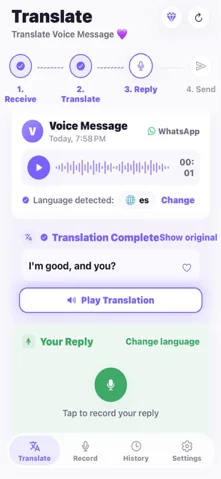
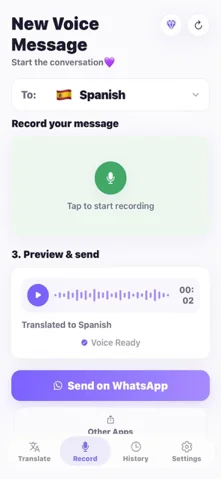
ReplyLingo is the better choice for the core job of understanding a voice message and answering it: you share the voice note from WhatsApp or Telegram, read and hear the translation, and reply by voice in the sender's language. It is free to start (3 free translations a week), needs no account, keeps no server copy of your audio, and sends your data to two AI providers, not a long list. Choose VocaLingo if you want your replies to sound like you: it clones your own voice, which ReplyLingo does not do. Both apps work from your phone's share sheet.
Our verdict: choose ReplyLingo if…
- You want the simplest path from a voice note you don't understand to an answer they do: share, read and hear the translation, record your reply, and it is spoken in their language (55 languages for spoken replies, 100+ languages to translate into).
- You want to try it with no setup: ReplyLingo is free to start with 3 free translations a week and you continue as a guest. VocaLingo's help pages say it has no free plan with a monthly allowance and that a new account starts with 0 tokens.
- You care about what happens to your audio: ReplyLingo keeps no server copy of your audio, transcripts or translations, your history stays on your phone, and data goes to two providers, OpenAI and Google Cloud. VocaLingo's privacy policy lists many processors and says results and their source files stay in your account while the history entry exists.
- You want one simple plan: ReplyLingo has a free allowance and a Pro subscription that removes the limit, with no tokens to buy.
- You also translate typed or spoken text: ReplyLingo has a Text tab and a Reply by text option.
Choose VocaLingo if…
- You want your replies to sound like you. VocaLingo clones your own voice and speaks the translation in it. Its help pages say instant cloning works in 10 languages, and its App Store listing says audio translation in your own voice works in 22 languages. ReplyLingo speaks replies in a synthetic voice, not yours.
- You also want to translate or dub video and use other voice tools. Its App Store listing describes cloning, dubbing and video summaries, and ReplyLingo does not translate video.
- You want a web version too. VocaLingo has one (it cannot receive shared files, so the phone app does the sharing).
How the two compare in practice
The core job is the same. You long-press a voice message in WhatsApp or Telegram, tap Share or Forward, and choose the app. You read what was said in your language, record your reply, and the app sends back an audio reply in the other person's language.
The difference is what each app optimises for. ReplyLingo optimises for the shortest, cheapest path to understanding and answering, with minimal data kept. VocaLingo optimises for how the answer sounds (your own cloned voice) and for a wider toolbox, which is why it works on tokens and a higher-priced Premium plan.
Neither is a live-conversation tool. If you want to talk face to face, Apple Translate or Google Translate are better, as our iPhone guide explains.
Sources
VocaLingo facts come from VocaLingo's own pages, read on 20 November 2026. Where its pages give different figures (its home page says 80+ and 100+ languages, its listing says 22 for audio in your own voice, and its home page shows a free plan while its help page says there is no monthly allowance), we say so instead of picking one. ReplyLingo facts come from the ReplyLingo app and this site.
ReplyLingo vs VocaLingo at a glance
VocaLingo's column is based on its own pages, read on 20 November 2026. "Not stated" means its pages do not say.
| Feature | ReplyLingo | VocaLingo |
|---|---|---|
| Translate a shared voice message | Yes, from the share sheet (WhatsApp, Telegram, any app that shares audio) | Yes, from the share sheet (WhatsApp, Telegram, Viber, iMessage) |
| Reply by voice | Yes, spoken in the sender's language (55 languages) | Yes |
| Voice used for the reply | Synthetic voice, not your own | Your own cloned voice |
| Reply by text | Yes | Not stated |
| Languages | 100+ to translate into, 55 with spoken replies | Its pages give different figures: 22 for audio in your own voice, and 80+ or 100+ elsewhere |
| Video translation | No | Yes, per its listing |
| Platforms | iPhone and Android | iPhone, Android and web |
| Account needed | No, continue as a guest | Sign-in needed (account or guest) |
| Free plan | 3 free translations a week | Help page: no monthly allowance, a new account starts with 0 tokens; free tokens for referrals and reviews |
| Price | Free to start, Pro subscription (price shown in the app) | Premium about $19.99 a month or $119 a year, plus token packs from $2.99 |
| Voice message length | Up to about 3 minutes | No duration limit stated; combined messages must fit 100 MB |
| Audio and results kept | No server copy of audio, transcripts or translations; history stays on your phone | Results and source files stay in your account while the history entry exists (3 latest entries without Premium) |
| Data processors | OpenAI and Google Cloud | Many listed, including OpenAI, Google, Anthropic, xAI, DeepSeek, MiniMax and ElevenLabs |
Related guides
Frequently Asked Questions
Try ReplyLingo on your next voice message
Free to start. No sign-up needed. Continue as a guest.