
Comparison
ReplyLingo vs Microsoft Translator: which is better for voice messages?
Microsoft Translator is a free all-round translator. ReplyLingo is built for one job: understanding a voice message you receive and answering it. Here is how they differ.
Last updated: 24 November 2026
We make ReplyLingo. Microsoft Translator facts come from its App Store listing, read on 24 November 2026. Apps change, so check its listing before you decide.
The short answer
Choose ReplyLingo if you want to take a WhatsApp or Telegram voice message from the share sheet, read and hear it in your language and reply by voice in the sender's language. Choose Microsoft Translator if you want a free general translator for text, speech and pictures: its App Store listing says it translates text, speech and images in over 100 languages for free, and it does not describe taking in a shared voice message.
Our verdict: choose ReplyLingo if…
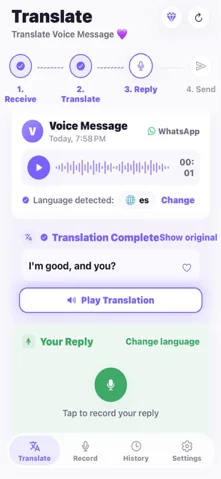
- Your problem is a voice message you cannot understand. Long-press it in WhatsApp, tap Share, choose ReplyLingo, and you get the transcript, the translation and a spoken version, with the language detected for you.
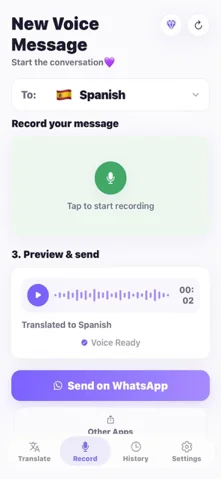
- You want to answer back by voice in their language, in 55 languages, with a preview before you send.
- You want a history of translated voice messages and a Show original button for the transcript in the spoken language.
Choose Microsoft Translator if…
- You want a free all-purpose translator. Its App Store listing says "Translate text, speech, and images in over 100 languages — for free."
- You need to translate text in pictures, such as signs and menus, which ReplyLingo does not do.
- You want real-time speech translation. Its listing names it as a feature. Note that the listing also says its multi-device conversation feature has been retired.
How the two compare in practice
Microsoft Translator is a general tool: you type, speak or point your camera. Its listing does not describe taking a voice message shared from WhatsApp, so for a recorded voice note you would usually need a workaround such as playing it aloud near the phone.
ReplyLingo starts from the voice message itself. That is why it is faster for this specific job and why it cannot translate pictures. If you do both, use Microsoft Translator for signs and live conversation, and ReplyLingo for voice notes.
Sources
Microsoft Translator facts come from its Apple App Store listing, read on 24 November 2026 (iPhone and iPad listing, seller Microsoft Corporation, rated 4.8 from 158K ratings, version 26.7.1). We did not verify other platforms. ReplyLingo facts come from the ReplyLingo app and this site.
ReplyLingo vs Microsoft Translator at a glance
Microsoft Translator's column is based on its App Store listing, read on 24 November 2026. "Not shown" means the listing does not say.
| Feature | ReplyLingo | Microsoft Translator |
|---|---|---|
| Take a voice message from the share sheet | Yes (WhatsApp, Telegram, any app that shares audio) | Not shown |
| Translates | Voice messages, audio and text | Text, speech and images |
| Languages | 100+ to translate into, 55 with spoken replies | 100+ for text; speech language count not shown |
| Reply by voice in their language | Yes | Not shown |
| Translate text in pictures | No | Yes |
| Live speech translation | No, not a live interpreter | Yes, per its listing |
| Platforms | iPhone and Android | iPhone and iPad listing |
| Price | Free to start (3 free translations a week), Pro subscription | Free, per its listing |
| Account needed | No, continue as a guest | Not shown |
Related guides
Frequently Asked Questions
Try ReplyLingo on your next voice message
Free to start. No sign-up needed. Continue as a guest.