
Comparison
ReplyLingo vs Notta: which should you use for voice notes?
Notta is a transcription and meeting-notes platform. ReplyLingo is a voice message translator you answer from. They overlap only a little.
Last updated: 24 November 2026
We make ReplyLingo. Notta facts come from its pricing page, read on 24 November 2026 (its WhatsApp blog page was not available). Apps change, so check Notta's site before you decide.
The short answer
Choose ReplyLingo if you receive voice messages on WhatsApp or Telegram in a language you do not speak and want to read, hear and answer them: share the voice note into it and reply by voice. Choose Notta if you mainly record meetings, calls and long audio: its pricing page lists meeting recording, upload and link transcription, bilingual transcription and translation, and AI notes, for web, mobile and desktop.
Our verdict: choose ReplyLingo if…
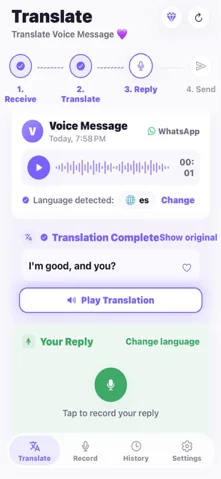
- The thing you struggle with is a voice message from a friend, family member, landlord or colleague. ReplyLingo takes it from the share sheet, detects the language and translates it.
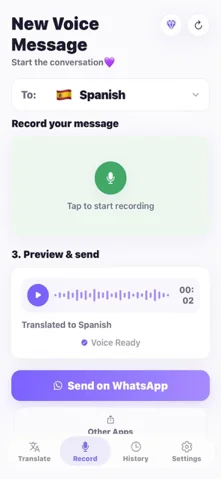
- You want to answer by voice in the sender's language, with the reply translated and previewed first (55 languages for spoken replies).
- You want a simple, light tool with a free start (3 free translations a week) and no account.
Choose Notta if…
- You record meetings. Its pricing page lists an online meeting recorder, a bot-free meeting recorder, and support for Zoom, Google Meet, Microsoft Teams, Webex and Slack.
- You transcribe long recordings or files. It lists upload and link transcription and, on paid plans, longer recordings and more file uploads.
- You need AI notes and summaries, or business features. It lists AI notes, follow-up emails and a Business plan, and its FAQ says it is SOC 2 Type II and ISO 27001 certified and hosts customer data on Amazon Web Services.
How the two compare in practice
Notta is a platform you work in: you capture or upload audio, then edit and summarise the transcript. Its pricing page does not describe taking in a WhatsApp voice note from the share sheet, so we cannot say how it handles that job.
ReplyLingo is a tool you pass a voice message through: share, read, hear, reply. It does not summarise meetings or record calls. Many people would use Notta for work meetings and ReplyLingo for chat voice notes.
Sources
Notta facts come from its pricing page, read on 24 November 2026. The page was long and parts were summarised for us, so we do not quote its prices or exact plan limits; check them on Notta's site. ReplyLingo facts come from the ReplyLingo app and this site.
ReplyLingo vs Notta at a glance
Notta's column is based on its pricing page, read on 24 November 2026. "Not shown" means the page does not say.
| Feature | ReplyLingo | Notta |
|---|---|---|
| Main purpose | Understand and answer voice messages | Transcribe meetings, calls and audio, with AI notes |
| Take a WhatsApp voice note from the share sheet | Yes | Not shown |
| Translation | Yes, 100+ languages | Yes: real-time, bilingual and monolingual translation features listed |
| Reply by voice in their language | Yes (55 languages) | Not shown |
| Meeting recording | No | Yes (Zoom, Google Meet, Microsoft Teams, Webex, Slack) |
| Platforms | iPhone and Android | Web, iOS, Android, Mac, Windows and Chrome extension |
| Free plan | 3 free translations a week, no account | A free plan exists; see its pricing page for limits |
| Security statements | No server copy of audio, transcripts or translations; data goes to OpenAI and Google Cloud | FAQ: SOC 2 Type II and ISO 27001; data hosted on Amazon Web Services |
Related guides
Frequently Asked Questions
Try ReplyLingo on your next voice message
Free to start. No sign-up needed. Continue as a guest.